Creating class based comment-functionality with Django
The idea of this article is to show you how you can create a commenting possibility to a web page. The scope is a working local version with email-notifications.
Kalle Tolonen
5.7.2022
Requirements
- A working Django project (I used Django 3.2 for this)
- A basic understanding of Django and object oriented programming
- Time for trial and error
- A registered superuser for admin console
- Working settings for a local email-daemon, you can get those here
Comment model
As a first step we’ll create the model for the comments.
#models.py in your app-folder

class Comment(models.Model):
    def get_absolute_url(self):
        return f"/article/{self.slug}"

    article = models.ForeignKey("Article",null=True, default="", on_delete=models.SET_NULL, related_name='comments')
    name = models.CharField(max_length=80)
    email = models.EmailField()
    message = models.TextField()
    created_on = models.DateTimeField(auto_now_add=True)
    moderated = models.BooleanField(default=False)

    class Meta:
        ordering = ['created_on']

    def __str__(self):
        return 'Comment: {} by: {}'.format(self.message, self.name)
I modified the source on a few select spots to make it relevant to my code. My comments are on my articles, so I needed to reference those on my foreign key reference and I wanted a moderation functionality, so that only the comments I approve will show up on my website to keep the content coherent and value providing.
The Meta-class makes the comments order from newest to oldest and the str-function tells Django what should be printed when the method is called (ie. in the admin console).
Next it was time for migrations, so that the model would be a part of the application.
./manage.py makemigrations
./manage.py migrate
Migrations for 'mainsite':
ktcom/mainsite/migrations/0003_comment.py
- Create model CommentOperations to perform:
Apply all migrations: admin, auth, contenttypes, list, mainsite, sessions
Running migrations:
Applying mainsite.0003_comment... OKAdmin.py
To make the model visible on the admin panel, we need to add it there.
#admin.py in the app folder

from django.contrib import admin
from . import models
admin.site.register(models.Article)
admin.site.register(models.Comment)
I only needed really basic funtionality, so I’ll be using the stock admin console for my moderate moderation needs.
Testing it on the admin-console
After logging in to the admin console, I could add a comment and it showed a relation to my Article-model.
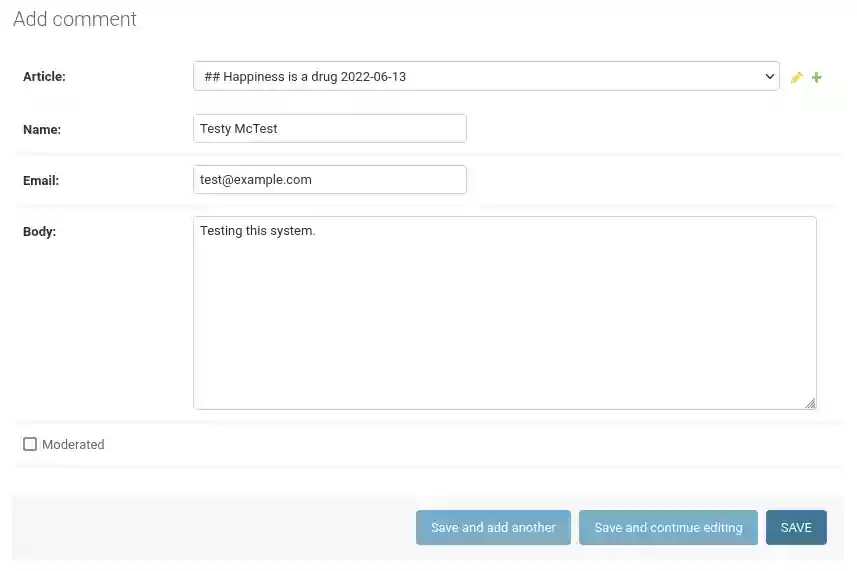
The relation was evident
Creating a form to add comments
A comment-feature isn’t helpful, if a regular user can’t use it without credentials. To do that, we need to make a custom form.
#forms.py additions

from django import forms
from .models import Comment

class CommentForm(forms.ModelForm):
    class Meta:
        model = Comment
        fields = ['name','email','message']
Views
To make comments visible outside admin, we need to make modifications to views.py.
#views.py additions

from . import models
from .forms import CommentForm
from django.views.generic import DetailView
from django.views.generic.edit import FormMixin

#Redirection after form has been sent
def commentThanks(request):
    return render(request, "mainsite/comment_thanks.html")

#A model based view with 2 props
class ArticleDetailView(FormMixin, DetailView):
    model = models.Article
    form_class = CommentForm

    #Load moderated comments as "comments"
    def get_context_data(self, **kwargs):
        context = super().get_context_data(**kwargs)
        context['comments'] = self.object.comments.filter(moderated=True)
        return context

    #Override default post(?)-method - comment would be appriciated!
    def post(self, request, **kwargs):
        self.object = self.get_object()
        form = self.get_form()
        if form.is_valid():
            return self.form_valid(form)
        else:
            return self.form_invalid(form)

    #What to do when the form is deemed valid
    def form_valid(self, form):
        form.instance.article = self.object
        form.save()

        #A try-catch for sending an email notification
        try:
            send_mail(f'{form.instance.article} new comment', f'{form.instance.message} from {form.instance.name}', 'kalle@kalletolonen.com', ['kalle@kalletolonen.com'])
        except BadHeaderError:
            return HttpResponse('Invalid header found.')

        #Redirect to thank you-screen
        return redirect ("comment_thanks")
Templates
To show the comments on articles, I needed to make some changes to my templates.
    <div class="content-container-inner">
        <h4>Comments</h4>
        {% if comments.count == 0 %}
            No published comments yet.
        {% endif %}

        {% for comment in comments %}
            <p>
            {{ comment.message }}<br>
                <i>
                    {{ comment.name}}
                </i>
            </p>
        {% endfor %}
    </div>
    <div class="content-container-inner">
        <hr>
        <h3>Add a comment</h3>
        <form method = "post">
            {{form.as_p}}
            {% csrf_token %}
            <p>
                <input type="submit" class="color-button" id="formbutton" value="Submit">
            </p>
        </form>
    </div>
This will only show comments that have been validated by admin. Since the filtration is done on the back-end, I only get comments that are moderated as a result in my front-end.
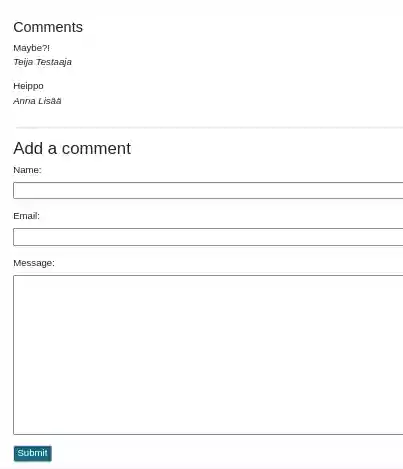
Only moderated content
Source(s)
Comments
No published comments yet.
Add a Comment
Your comment is held for review before it appears publicly.