Creating a Node/SQLite Backend
My Definition Wordle-project needs porting to a more user friendly UI, so I'll need to connect the data from SQLite to a Node backend. Come along for the journey!
Kalle Tolonen
11.9.2022
Setup for the server
First, I made a new directory for my backend.
mkdir deftle-sqlite-be
cd deftle-sqlite-be
npm init
I named the entry point as server.js.
npm install express
npm install sqlite3
npm install md5
micro server.js
// Create express app
var express = require("express")
var app = express()

// Server port
var HTTP_PORT = 8000
// Start server
app.listen(HTTP_PORT, () => {
    console.log("Server running on port %PORT%".replace("%PORT%",HTTP_PORT))
});
// Root endpoint
app.get("/", (req, res, next) => {
    res.json({"message":"Ok"})
});

// Insert here other API endpoints

// Default response for any other request
app.use(function(req, res){
    res.status(404);
});
#package.json
"start": "node server.js",
#added this under scripts.To test things out, I started the server and checked my localhost:8000.
npm run start (runs start-script)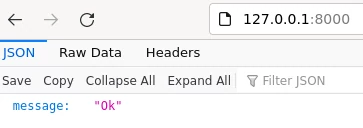
The server was running.
Setup for the database
I have my db in the data/-directory, that’s relative to the directory my code is in.
#database.js

var sqlite3 = require('sqlite3').verbose()

const DBSOURCE = "data/words.db"

let db = new sqlite3.Database(DBSOURCE, (err) => {
    if (err) {
      // Cannot open database
      console.error(err.message)
      throw err
    }else{
        console.log('Connected to the SQLite database.')
        db.run(`SELECT * FROM wordlist`)
    }
});

module.exports = db
After this, I made a copule of additions to my server.js.
#server.js

// Create express app
var express = require("express")
var app = express()
var db = require("./database.js")

// Server port
var HTTP_PORT = 8000
// Start server
app.listen(HTTP_PORT, () => {
    console.log("Server running on port %PORT%".replace("%PORT%",HTTP_PORT))
});
// Root endpoint
app.get("/", (req, res, next) => {
    res.json({"message":"Ok"})
});

// Insert here other API endpoints
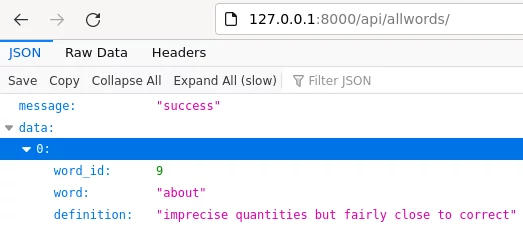
app.get("/api/allwords", (req, res, next) => {
    var sql = "select * from wordlist"
    var params = []
    db.all(sql, params, (err, rows) => {
        if (err) {
          res.status(400).json({"error":err.message});
          return;
        }
        res.json({
            "message":"success",
            "data":rows
        })
      });
});

// Default response for any other request
app.use(function(req, res){
    res.status(404);
});
My new API will now query all the words, so that’s a great starting point to construct other things on.
Source(s)
Comments
No published comments yet.
Add a Comment
Your comment is held for review before it appears publicly.