Creating a Node/PostgreSQL Backend
I needed a backend to further my Angular skills, so I learned how to make one with node.js.
Kalle Tolonen
10.9.2022
Requirements
- Being comfortable with Linux
- Node installed
- PostgreSQL installed
- Material in the database to work with
Getting started
First, let’s check that we have the tools that are needed for the job.
$ node -v
v18.8.0
$ which psql
/usr/bin/psql
Let’s create a new db. First I needed to modify my local PostgreSQL-setting to allow to make a new db.
sudo micro /etc/postgresql/13/main/pg_hba.conf # Database administrative login by Unix domain socket
local all postgres trustThat was changed to ‘trust’ from peer in the conf line. Don’t use this setting in a production enviroment, as it says that anyone who has access to the server can also access the database. The dbms also required a restart for the changes to take effect.
/etc/init.d/postgresql restartAfter that I was able to actually crate an empty database for my future backend to utilize.
sudo createdb -U postgres deftle_beThe command defines that a new database (deftle_be) is created and connected to as postgres-user.
Now that we have database, we can test it out.
psql
\c deftle_be
You are now connected to database "deftle_be" as user "kallet".create table test(id int not null);
insert into test values(1);
insert into test values(2);
select * from test;deftle_be=> select * from test
deftle_be-> ;
id
----
1
2
(2 rows)That worked!
Creating the backend
I create a new directory for my backend and initiated a npm project.
npm init #I used stock settings
npm install --save express
npm install --save pg-hstore #this is a serialization plugin for postreSQL
npm install --save body-parser
npm install --save pg
micro index.js
// Entry Point of the API Server
const express = require('express');
/* Creates an Express application.
The express() function is a top-level
function exported by the express module.
*/
const app = express();
const Pool = require('pg').Pool;
const pool = new Pool({
user: 'user',
host: 'localhost',
database: 'deftle_be',
password: 'pwd',
dialect: 'postgres',
port: 5432
});
/* To handle the HTTP Methods Body Parser
is used, Generally used to extract the
entire body portion of an incoming
request stream and exposes it on req.body
*/
const bodyParser = require('body-parser');
app.use(bodyParser.json())
app.use(bodyParser.urlencoded({ extended: false }));
pool.connect((err, client, release) => {
if (err) {
return console.error(
'Error acquiring client', err.stack)
}
client.query('SELECT NOW()', (err, result) => {
release()
if (err) {
return console.error(
'Error executing query', err.stack)
}
console.log("Connected to Database !")
})
})
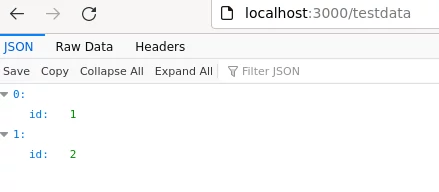
app.get('/testdata', (req, res, next) => {
console.log("TEST DATA :");
pool.query('Select * from test')
.then(testData => {
console.log(testData);
res.send(testData.rows);
})
})
// Require the Routes API
// Create a Server and run it on the port 3000
const server = app.listen(3000, function () {
let host = server.address().address
let port = server.address().port
// Starting the Server at the port 3000
})Be sure to modify this to your specs. To test this out I ran my server.
node index.jsAnd sure enough, that worked.
Troubleshooting
I had problems with database authentication and found some help with this source:
Source(s)
Comments
No published comments yet.
Add a Comment
Your comment is held for review before it appears publicly.